How SuperIvy is built and operated
The engineering and operations guide for Ivy, an influencer relations agent: how it is built, how people operate it, and how its work connects to SuperOrgs.

SuperIvy is an influencer relations agent. It discovers people, gathers public evidence about them, scores fit, and prepares campaign work for a person to decide on. It runs as its own service on one Fly machine, talks to its team through a Slack app, and reports its runs to SuperOrgs through the SDK.
This is Ivy's engineering and operations guide, published the way the people who run it use it. It keeps three things together: how the system is built, the procedures for operating it, and the evidence from its deployment. It is written for the people who inherit and operate the agent, and it says where a figure is historical rather than current. The diagrams and screenshots are the document's own.
- How Ivy is built. Architecture, scoring, reasoning, human review and daily operation.
- Build and connect through SuperOrgs. Plan the agent, assign abilities, connect the runtime and verify activity.
- Deployment. Release a reviewed change, configure the service and recover safely.
How Ivy is built
The system and its responsibilities
SuperIvy is an influencer relations manager. It discovers people, gathers public evidence, scores fit and prepares campaign work for human review. People set the objective, choose relationships, carry out outreach and record campaign outcomes.
The stack is TypeScript, Next.js 16, LangGraph and LangChain, Drizzle and SQLite. One Fly machine runs two processes against the same persistent records:
- The web process serves the workspace and web chat and handles authenticated requests.
- The worker process runs jobs and schedules, discovery and reviews, and Slack and delivery. It owns the Socket Mode connection to Slack.
Both go through the same services, rules and typed integrations, which hold authority, budgets, identity and persistence, and write to durable storage under /data: SQLite, jobs, receipts, reports and backups. Model and source calls go out to the configured model APIs and to public source providers, which supply evidence and bounded reasoning. External destinations are optional and configured one by one: SuperOrgs receives activity, Notion receives eligible people, and Databricks receives telemetry.
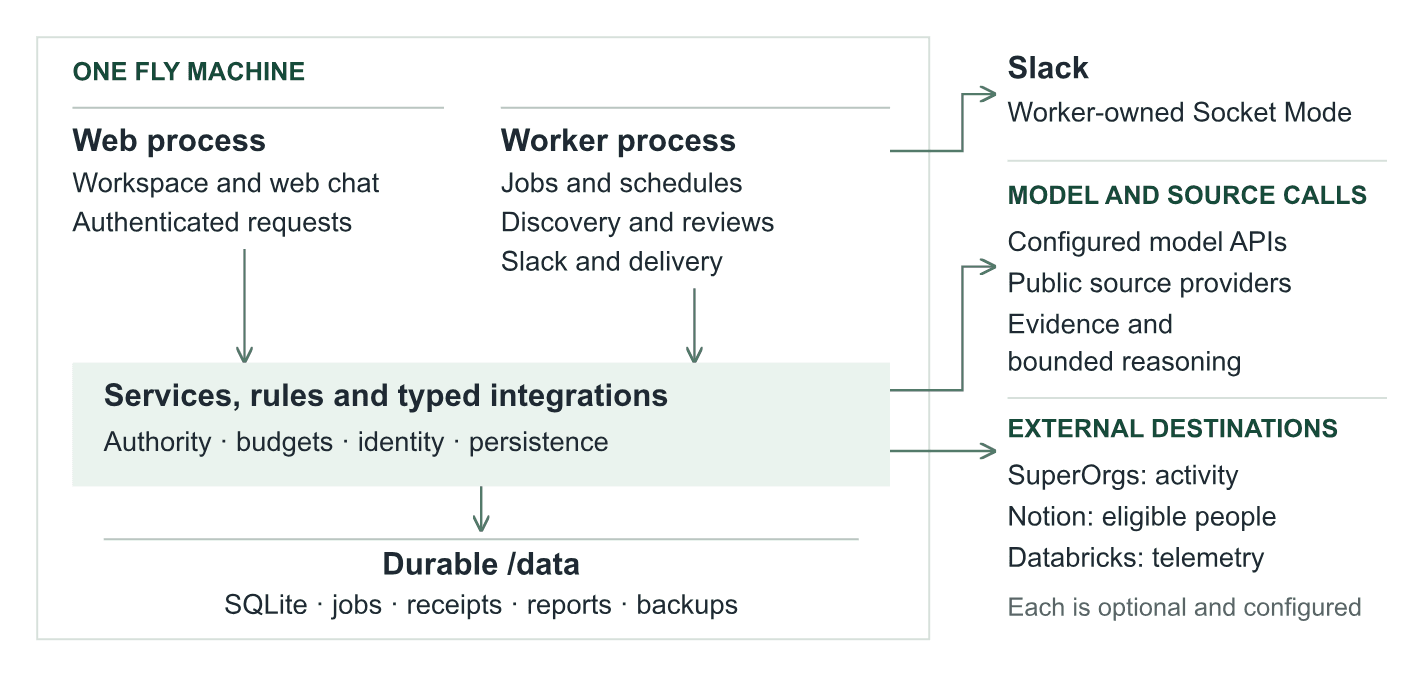
Figure 1. The web process serves the workspace. The worker handles background jobs, schedules, Slack and activity delivery.
Each responsibility has one home:
- Interpreting evidence and choosing permitted tools belongs to model reasoning, in research, chat and campaign reviews, and to structured model evaluation for relevance.
- Enforcing execution rules belongs to code, which controls identity, credibility, scoring arithmetic, routing, budgets, permissions and persistence.
- Making relationship decisions belongs to people, who approve or reject records and proposals, send outreach, publish and pay externally.
- Keeping the work inspectable belongs to SQLite, which retains evidence, decisions, jobs, conversations and delivery receipts. SuperOrgs receives selected activity through the SDK.
Why separate web and worker? Closing the browser should not abandon a queued run. Services own the records; durable jobs let the worker continue independently of a page request.
Discovery through LangGraph
A saved brief supplies the objective, audience, exclusions and platform and scope targets. LangGraph follows fixed stages; model reasoning is used inside selected stages.
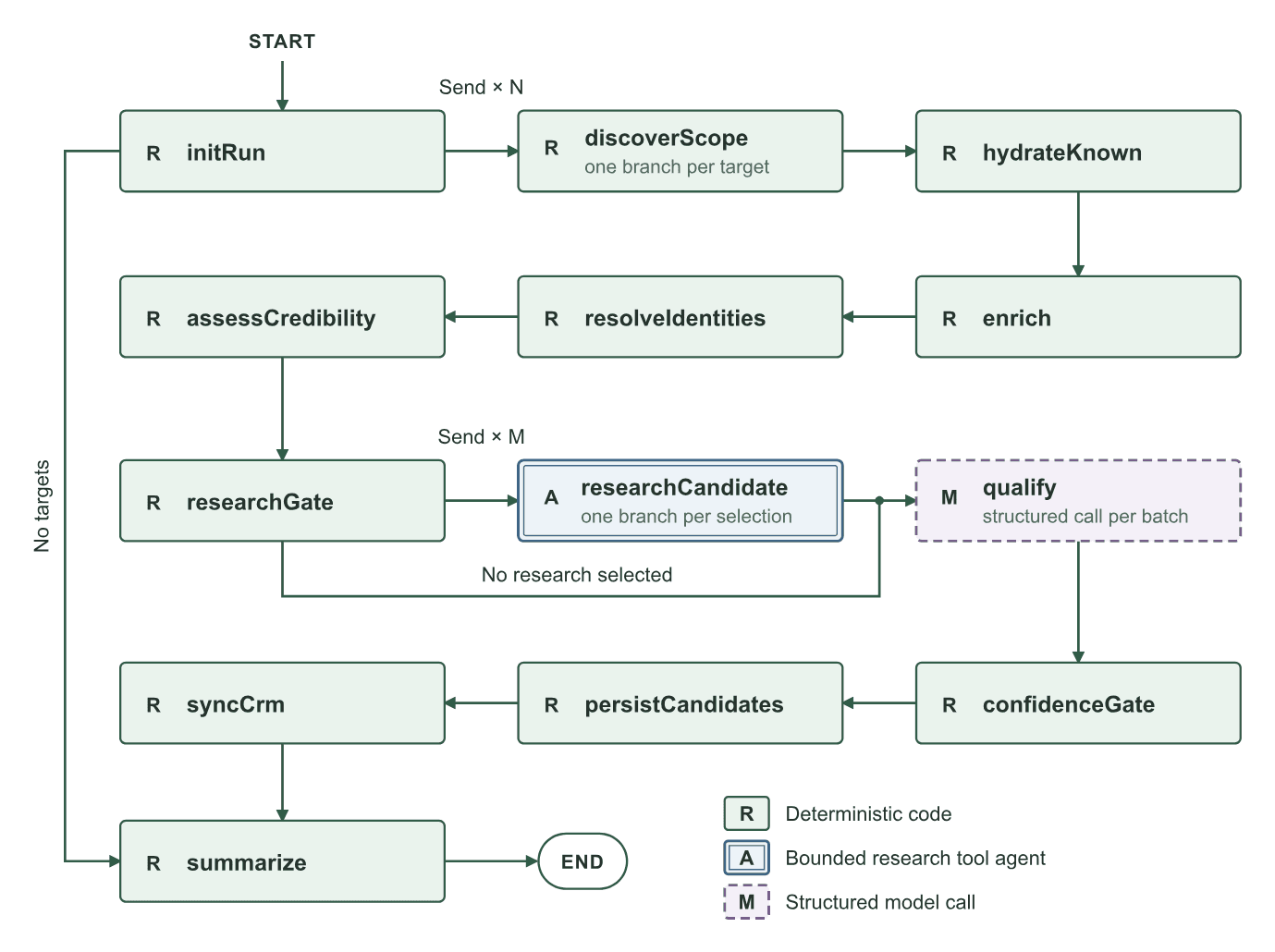
Figure 2. R means deterministic code; A is the research tool agent; M is a structured model call.
A run starts with initRun, then fans out one discoverScope branch per target. The results flow through hydrateKnown, enrich, resolveIdentities and assessCredibility to researchGate, which sends one researchCandidate branch per selected person. qualify then scores the candidates in batches, and confidenceGate, persistCandidates, syncCrm and summarize close the run. Every one of those nodes is deterministic code except two: researchCandidate is a bounded research tool agent, and qualify is a structured model call.
- Collect. Validate up to 12 targets, fan out source searches and combine results.
- Resolve. Hydrate known people, enrich missing facts, resolve identities and compute credibility.
- Assess. Select candidates for research, score fit, then apply the routing rules.
- Save. Persist people, synchronize eligible CRM records when configured, and record the outcome.
With no targets, initialization goes straight to summary. With no research selected, the research gate goes straight to qualification. Source failures become coverage gaps while other branches may complete.
Identity rule: a directed profile link can merge accounts. A matching handle or shared website only marks ambiguity. The record keeps which profile asserted the link.
How scoring works
A person has three distinct measurements: relevance is model-assessed fit, credibility is computed from observed evidence, and reach is the audience size reported by a source.
Relevance: model judgment, code arithmetic. For rubric v1, the model returns a 0 to 10 score and a reason for each component, plus confidence. Code computes the weighted total.
- Topical relevance, 30%. Evidence of work in the brief's subject.
- Audience fit, 25%. A match to the intended audience.
- Engagement quality, 20%. Substance of engagement, not followers alone.
- Niche influence, 15%. Useful work and standing in the relevant community.
- Reachability, 10%. Supported ways to begin a relationship.
Scoring uses batches of four because a larger live batch truncated its structured response. Invalid values or missing reasons invalidate an entry. Omissions can receive one budget-admitted recovery request; unsupported or duplicate indexes are discarded.
Credibility: evidence, not popularity. Code considers account age, bio, profile links, original work, activity, body of work and engagement. Follower count is excluded. Strong requires at least eight points and no more than one concern; thin is three points or fewer; other results are moderate.
Routing: apply these rules in order.
- An unscored candidate with thin credibility and at most one observed signal is automatically rejected without qualification spend.
- A score below 40 is rejected. At 40 or above, a qualification flag requires review.
- Automatic qualification requires 75 or above, high confidence, at least three evidence items, strong credibility and no flag.
- Everything else goes to human review.
Example: relevance 81 with moderate credibility and one evidence item still requires review. A strong topical score is only one part of the decision. Automatic qualification may permit CRM sync; it does not contact anyone.
Where the model reasons
The model has different freedom in each workflow. Discovery follows the graph; research and chat use LangChain agents, while campaign review has a separate custom model and tool loop. Markdown files in prompts/ hold the instructions for each task, separate from tool implementations.
- Candidate research. The model can read a profile, recent work or Ivy's stored person record, and synthesize findings. Code sets the selection, three read-only tools, provenance checks, a 12-step recursion limit and a 90-second timeout.
- Qualification. The model judges five rubric components and explains the result. Code sets the structured output, the batch size, the weighted score and the final route. There is no open-ended tool loop.
- Web and Slack chat. The model inspects saved records, answers questions and calls permitted work controls on explicit requests. Code allows eight model calls per turn and applies permissions and job limits. History compaction starts beyond 6,000 tokens and retains ten messages.
- Campaign review. The model chooses supporting records to inspect, then proposes an artifact. Code sets deferred tool loading, evidence requirements, spend admission, revision and human approval.
Research spends effort selectively. A candidate must be new, undismissed and unmerged, with moderate or strong credibility. It needs at least two signals or a repository or video, and must still lack a bio or three evidence items. The highest-priority eligible candidates receive research within the run cap.
Citations are checked against discovered or fetched evidence. Unmatched findings retain an unverifiedSource flag. Provider text remains evidence to assess, not authority to change permissions or execution rules.
Campaign tools load when needed. The campaign loop begins with readCampaign and loadCampaignTools. The model reads the brief, selects capabilities, then uses the loaded schemas on its next turn. It can request up to four schemas at a time. This keeps the initial context small while allowing focused investigation.
Design tradeoff: budgets and tool permissions limit the work, but they do not establish that a model's conclusion is true. Review the cited evidence before acting on a proposal.
Campaign work and human decisions
A campaign holds the objective, participants, deliverables and measured outcomes. Ivy reviews those saved facts and proposes the next useful artifact.
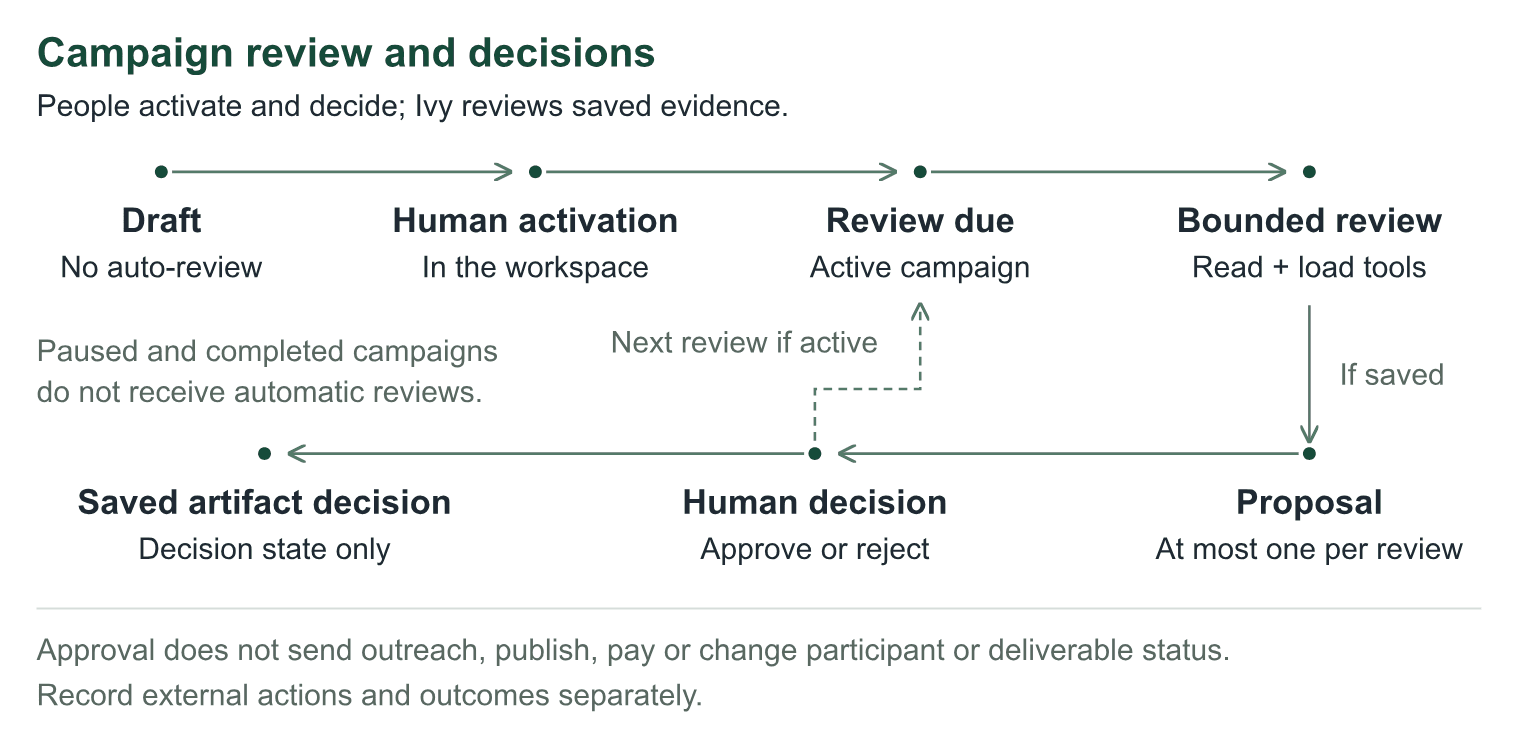
Figure 3. The loop revisits active work. An approved artifact is a saved decision, not an external action.
People activate and decide; Ivy reviews saved evidence. A campaign begins as a draft, which gets no automatic review. A person activates it in the workspace. When a review comes due on an active campaign, Ivy runs a bounded review: it reads the campaign and loads its tools. If it saves a proposal, at most one per review, a person approves or rejects it, and that saved artifact decision is a decision state only. The loop then returns to the next review while the campaign stays active. Paused and completed campaigns do not receive automatic reviews. Approval does not send outreach, publish, pay or change participant or deliverable status; external actions and outcomes are recorded separately.
- Prepare the campaign. In Campaigns, create a draft with objective, audience and success metric. Add participants, optional creator links, deliverables, dates and sourced observations.
- Activate it in the workspace. The default review cadence is 24 hours; supported values are 6 to 168 hours. Draft, paused and completed campaigns receive no automatic reviews. Chat can create a draft, but cannot activate it.
- Review the proposal. Ivy can draft outreach, review a submission, suggest strategy, request information or summarize performance. Performance proposals require recorded metrics.
- Decide, execute and update. Approve or reject in Ivy or its authorized private Slack channel. A person carries out external work and records the outcome for the next review.
Per review: at most one artifact, six model calls, ten tool calls, five minutes, 120,000 combined tokens and $2 estimated model spend, subject to stricter saved limits. At most five current proposals can remain pending per revision.
Editing campaign facts expires old proposals and makes an active campaign due again. Decisions require a current, unexpired artifact. Slack also validates the approver and matching message receipt; a shortened preview must be approved in Ivy. Ivy does not monitor creator inboxes, fetch live campaign metrics, publish or pay.
Use the web workspace
Open superivy.fly.dev and sign in with the configured passphrase. For local development, use the address from pnpm dev. The workspace is the operating interface for Ivy's evidence and decisions.
- Overview. Inspect the latest run, coverage gaps, spending and queue. A completed run can have partial coverage.
- Discovery. Save the brief, select scopes and review the window and budget. Start a run or use its schedule; inspect an active run instead of creating another.
- People. Filter by source, review state, scoring or credibility. Open the evidence, assessment history and identity provenance before deciding.
- Campaigns, Reports and Connections. Maintain campaign facts, inspect saved PDF deliveries and check integration health.
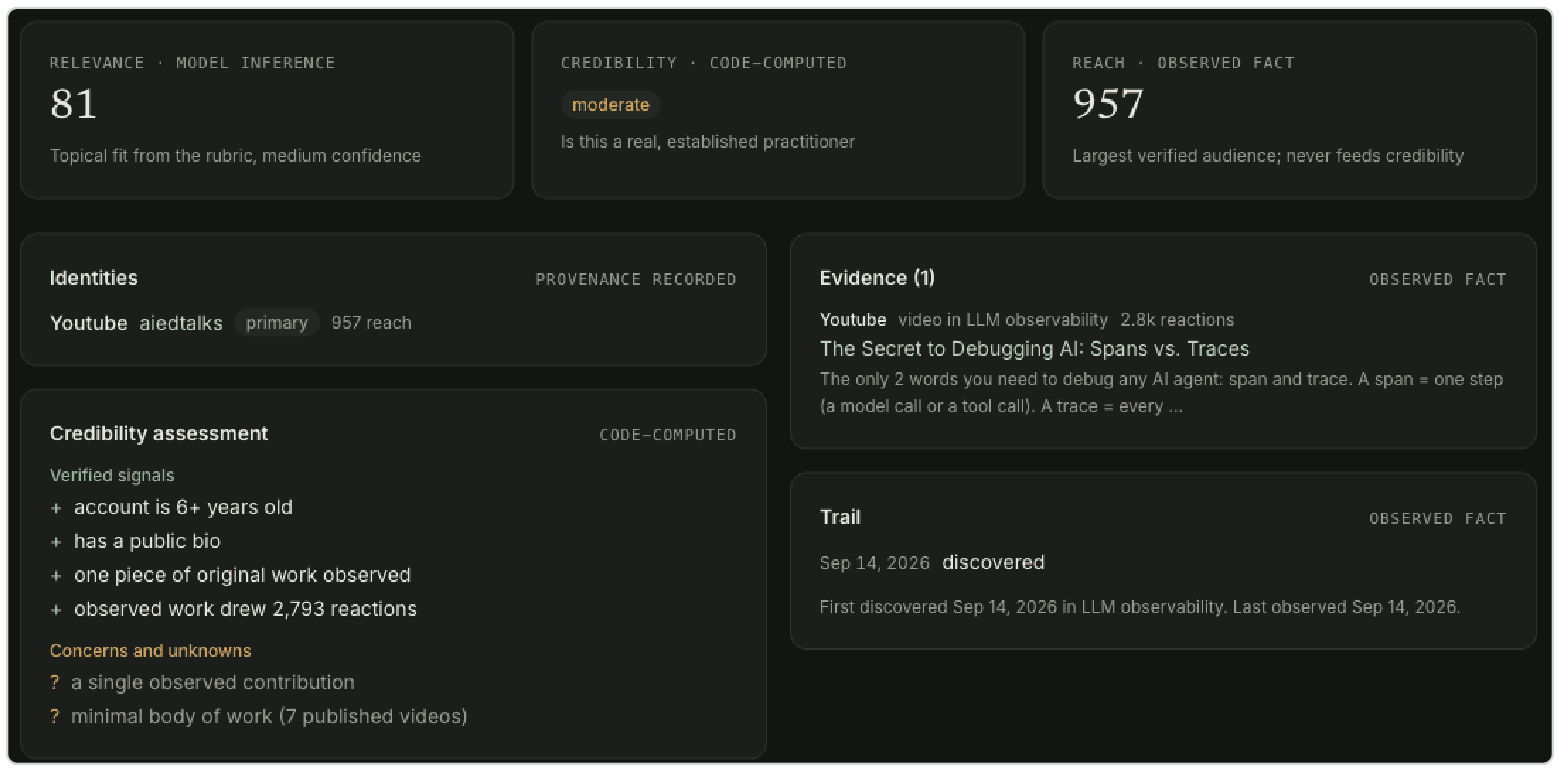
Figure 4. Read the evidence beside the score. This supplied record shows relevance 81, moderate credibility and one evidence item.
Read the evidence beside the score. A person record shows the three measurements side by side, each labeled with where it came from: relevance is model inference, credibility is code-computed, and reach is an observed fact that never feeds credibility. Under them sit the identities with their recorded provenance, the credibility assessment with its verified signals and its concerns and unknowns, the evidence items, and the trail of when the person was first and last observed. A record with relevance 81, moderate credibility and one evidence item still needs a person's review.
Approve records human approval and can make an undismissed person eligible for a later configured CRM sync. The button does not perform that sync. Reject records rejection and dismissal. Restore clears a dismissal and resets human status to new; it is not a general undo for approval.
The Approved bucket includes auto-qualified people as well as human-approved people. Later discovery preserves human decisions. Score the next batch assesses up to 50 unscored records without repeating research or enrichment; failed entries remain available for another bounded attempt.
Connect and use Ivy in Slack
Ivy has its own Slack app. The worker owns its Socket Mode connection; no public event webhook is required.
Install the app for the intended workspace.
- Create or select the dedicated SuperIvy app in Slack administration. Apply
docs/slack-manifest.json, which defines the required scopes, events and interactivity. - Install it in the intended workspace. Use its bot token and an app-level token with
connections:write; apply or reinstall permission changes when Slack requires consent. - Configure
SLACK_BOT_TOKEN,SLACK_APP_TOKEN,IVY_SLACK_TEAM_IDandIVY_SLACK_REPORT_CHANNELthrough deployment secrets. SetIVY_SLACK_APPROVER_IDSto the named users allowed to decide campaign proposals. - Invite the bot to the private channel. Restart the service after changing configuration, then test a mention, a report receipt and one agreed fictional approval case.
Use the conversation for requests and explanations.
- Mention Ivy or send a DM to begin. Continue inside a known channel thread without another mention.
- Ask about people, evidence, run outcomes, cost or reports. Explicitly request discovery, a report, schedule changes, a campaign draft or a campaign review.
- Check the saved result or job ID. A queued job is not a completed search or delivered file.
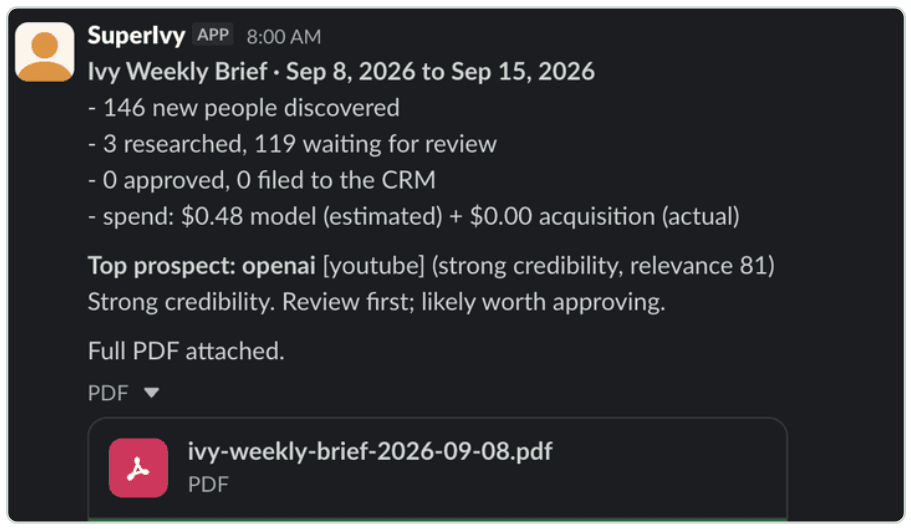
Figure 5. A supplied weekly-brief example. Verify the attached PDF against the saved report receipt.
The weekly brief lands in the report channel as a short message: how many people were discovered, researched, waiting for review, approved and filed to the CRM, the period's spend split into estimated model cost and actual acquisition cost, the top prospect with its credibility and relevance, and the full PDF attached. Verify the attached PDF against the saved report receipt.
Campaign tools and approval buttons require the configured private, non-shared channel and an allowlisted user. DMs and public channels remain ordinary-chat surfaces. Optional chat channel and user allowlists are separate. Approval records a decision; it does not send outreach or change a deliverable's status.
Schedules, limits and saved work
Make recurring work explicit. In Discovery, edit the existing schedule or ask Ivy to do so. Save the enabled state, time, IANA timezone and missed-slot policy. Check the next due time and the eventual job result. run_once collapses missed occurrences into one slot; skip moves past missed work. Pausing does not cancel an already queued job.
The retained September 14 observation showed discovery on Monday at 07:00 and reporting on Monday at 08:00, in America/New_York. Recheck the saved settings before relying on that schedule.
Use the budget for the correct kind of work. The default boundaries:
- Workspace discovery. $5; 50 candidates scored, three researched, up to 12 targets. Saved run settings can change the bounded limits.
- Chat-requested discovery. $1; ten scored, two researched, up to four targets and a ten-minute cooldown.
- Qualification backfill. $3; up to 50 unscored records, no research or enrichment.
- Scheduled work. A rolling seven-day $20 allowance shared by scheduled discovery and campaigns, including review reservations.
- Campaign review. $2 maximum estimated model spend per review, with stricter saved settings honored.
These are internal estimates, not provider invoices. Research can exceed initial admission within its recursion and time bounds; ordinary chat is limited by model calls rather than the discovery dollar cap. Unknown pricing blocks capped work. Per-run caps measure model estimates. The weekly allowance also counts recorded acquisition charges; X billing and hosting are outside that ledger.
Read the report and its receipt. Weekly PDFs use saved data and zero model calls. Period activity ends at UTC midnight on the reference date, while current queue counts can include later work. Stored snapshots preserve the shared facts; an older report without a snapshot can rebuild from current data.
Regenerating a PDF does not automatically resend it. Check the stored channel and file receipt and the actual Slack file before recovering uncertain delivery.
Preserve the operational record. SQLite retains decisions, jobs and receipts. A worker lease establishes ownership; it is not a LangGraph checkpoint. Interrupted discovery stays interrupted, and an explicit retry creates new linked work that may spend again. Discovery does not erase human approval, dismissal or an existing CRM reference.
Deployment evidence and lessons
What a real production run established. The retained observation from 14 September 2026, 16:14 UTC found the deployed web service and worker healthy. A scheduled discovery ran from 07:00:04 to 07:04:59 Eastern; the weekly PDF had a delivery receipt at 08:00:07.687. This is historical evidence, not a fresh availability check.
- 146 people persisted; 50 scored; three researched. Bounded discovery completed. These counters describe different stages, not disjoint groups.
- 119 in review; 27 rejected; zero auto-qualified. The routing rules retained human review. This does not measure whether the judgments were correct.
- $0.47888 estimated model cost; 40 SDK events acknowledged. Metered work reached the journal and receiver. This is neither a complete operating bill nor proof of business value.
- GitHub and YouTube configured; X and Reddit credentials missing. The run had partial source coverage. Completion must be read alongside coverage.
Failures that changed the engineering.
- Incomplete model output. A source-documented eight-person scoring batch truncated its JSON. Qualification now uses four candidates per call. Size work to its response budget and keep invalid output out of the decision path.
- A misleading evaluation fixture. An earlier fixture supplied a model score for a thin candidate that production would reject before scoring. The fixture and evaluator guard were corrected. Test the path production actually executes.
- Interrupted delivery and migration failure. A September 12 isolated container rehearsal injected a receiver outage, expired ownership and a migration failure. It verified retained events, rejected late writes and preserved records before recovery. Test the data and receipts, not merely that the process restarts.
What is evaluated, and what remains open. The September 12 records report 20 of 20 deterministic evaluation cases and 37 of 37 container rehearsal checks. The rehearsal used schema 6; these are historical controlled tests, not tests rerun against today's deployment. The checked evaluation record still marks the live-model evaluation as not run.
Before claiming qualification quality, use labeled creator examples, inspect false approvals and rejections, and run the configured live evaluation with an agreed spend cap. Keep reliability evidence, model quality and campaign impact as separate measures.
Build and connect through SuperOrgs
Plan the agent
SuperOrgs records Ivy's responsibilities, owner, abilities and pod. Ivy runs separately with its own workspace and database. Reuse the existing SuperIvy plan to preserve its history and assignments.
- Open Agent Planning, select SuperIvy, then Edit. For a genuinely new agent, use Add Agent Plan instead.
- In Identity, review Title, Name and Overview. Set Type, Engagement level, Sourcing, Source link, Platform, Agent harness and Lifecycle status to describe the implementation accurately; Ivy is built externally and uses LangGraph.
- In Assignments, confirm Owner (Agent Builder Employee or Agent Build Contractor), Department and Reports to. The owner becomes required from In Progress; also review the people Ivy supports and its start date where relevant.
- In Capabilities & cost, select the intended Outcomes, Tools and Abilities / deliverables, then review the cost and budget fields. These fields describe responsibility and expected spend; they do not configure Ivy's tools or spending controls.
- Review Graduation criteria and save. Creation uses Next through the four steps and Add agent at the end; editing offers Save changes on every step.
Co-create with AI can draft the form; Re-summarize from abilities refreshes its Overview. Review claims about supported sources and actions before saving.
Expected result: one accurate plan with a named owner and explicit scope. If editing is unavailable, check the account's agent permissions and owner scope; do not create another Ivy to bypass the problem.
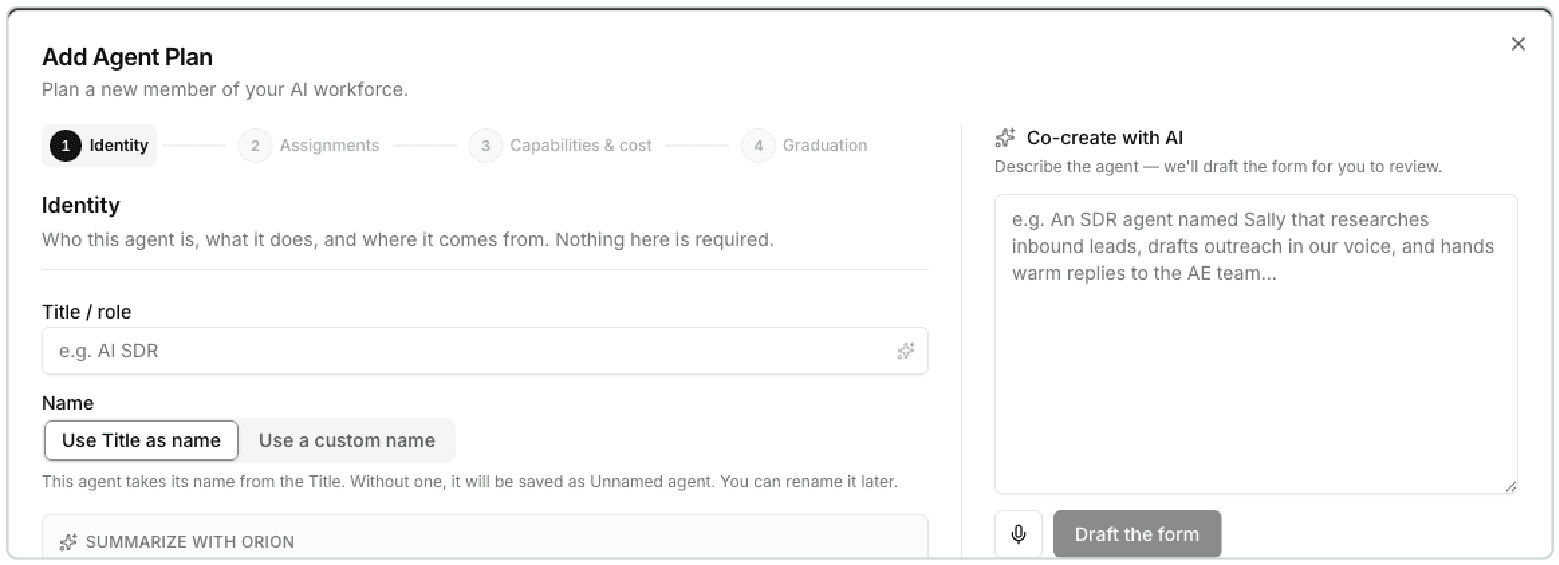
Figure 6. The wizard organizes identity, assignments, capabilities and graduation. Captured values are examples, not configuration instructions.
Define and assign abilities
An ability is a reusable description of work, such as discovering relevant creators or preparing a campaign review. Write its inputs, expected output, acceptance criteria and human decision points in the description. Assigning that record to Ivy does not add code, prompts, credentials or a schedule to the running agent.
- Open Agent Abilities and search for an existing match. Select Add Ability only when the required ability is missing.
- Enter Name and Description (optional). Add Source repo (optional) when implementation evidence is available, then select SuperIvy under Assigned Agents.
- Link relevant Outcomes and Tools. Choose Sharing Scope: All Agents, or Department Agents with the matching Department; this controls which agents can use the library record.
- Set Type (optional) to Always On, Scheduled, Triggered or Manual On-Demand as appropriate. Assigned To (optional) identifies the responsible person, while optional human and agent time estimates support comparisons; leaving the assignee empty defaults it from an assigned agent's owner.
- Select Create Ability. Review any similar-ability suggestions before creating a duplicate, then reopen the record and confirm SuperIvy appears under Assigned Agents.
To change an existing record, use its pencil Edit control or Actions, then Edit, adjust the fields and select Save Changes. The library also offers Assign agent when an ability has no agents.
Alternatively, open SuperIvy, then Edit, then Capabilities & cost, then Abilities / deliverables. Search and select an existing ability, or create one from the typed name, then Save changes on the agent; inline creation saves the library record immediately, but the agent assignment waits for that final save.
After implementation and verification, maintain the ability's Status: New, Backlog, In Progress or Live. Run eval opens a submission form for an Eval suite, optional Run results and Reviewer; Submit eval records the evaluation workflow, rather than invoking Ivy itself.
Expected result: the ability appears on Ivy and accurately describes implemented behavior. Creating requires agent-create permission; editing, assigning and changing status require agent-update permission, subject to scope.
Example ability specification. Prepare a campaign review, Scheduled. Review an active campaign's saved facts and due deliverables, then propose a cited artifact for human review. Acceptance requires a proposal tied to the current campaign revision, with the approval decision recorded separately. This is an example specification to adapt, not a claim that a library record already exists.
Build, place and link Ivy
The plan guides the build. Engineers implement the agreed abilities in Ivy's services, graph tools and Markdown prompts, verify the affected web and Slack workflows, and deploy the service. A planning label or ability type does not change the running implementation.
- Open Agentic Pods and reuse the intended pod. To create one, select New pod, enter Name and Mission, then Create pod.
- On the pod page, use Assign an agent, select SuperIvy and choose Assign. An agent belongs to one pod; moving an already assigned agent removes it from its previous pod.
- Add the responsible people with Add a person, select their Role, then Add. For future work, the Build plan picker offers This period, Next period or Unscheduled; changing it saves the planned start, not the agent's lifecycle or deployment.
- Verify Ivy's workspace at superivy.fly.dev. Before an SDK runtime is linked, the plan's Source link under Identity can hold the intended launch URL; Launch opens that URL, falling back to the platform URL only when it is empty.
- Verify Ivy's separate Slack app and private destination using its checked-in manifest and runtime configuration. Confirm a real reply and the saved report or approval receipt in the designated channel.
If Source link already displays a linked source, preserve it while reviewing the runtime connection. Clearing that chip or entering a manual URL clears the form's source-link association, so it is not a harmless URL-only edit.
The pod's Create Slack channel flow creates a public collaboration channel and invites matched pod members. Connect Slack or Update Slack concerns SuperOrgs' integration; neither installs Ivy's app or configures its private approval channel.
Expected result: the plan belongs to the intended pod, links reach the expected destinations, and Ivy's own workspace and Slack behavior work independently of streaming. Pod changes require pod-update permission; connecting SuperOrgs Slack requires settings-update permission.

Figure 7. The pod groups people and agent responsibilities. Its collaboration channel is separate from Ivy's private report and approval destination.
Connect the runtime
The planned agent carries organizational responsibility. A linked runtime identifies the running service that reports execution; its credential binds incoming events to the correct organization and runtime. Minting that credential does not host Ivy or deploy its code.
- In the intended organization, open Connectors, then SuperOrgs SDK, then Connect an agent. Select the existing planned SuperIvy in Agent.
- Read the proposed outcome: SuperOrgs creates a runtime under the plan or reuses a compatible linked runtime. A missing Platform, an incompatible existing link or a lifecycle that cannot accept deployment must be resolved first.
- Select Mint credential and save the value securely before choosing I have saved the credential. The full value is revealed once.
- In Ivy's Fly environment, set
SUPERORGS_STREAM_TOKENandSUPERORGS_URL=https://app.superorgs.com. SetIVY_PUBLIC_URL=https://superivy.fly.devfor report links, then restart or redeploy so the worker loads the values. - Verify delivery before considering setup complete. Ivy already integrates the SDK; a second generic sample client is unnecessary for connecting this implementation.
Optional SUPERORGS_AGENT_ID supplies metadata and does not authorize the connection. Optional SUPERORGS_ABILITY_ID declares an assigned ability for discovery and backfill only; use its actual UUID, and omit the setting if the intended mapping is unknown.
Minting requires integration-create permission and the appropriate owner scope. Creating and linking a new runtime also requires agent-create and agent-update permissions.
Expected result: the connector shows the intended plan, linked runtime and live credential. For rotation, use Mint replacement, install it, wait for its delivery receipt, then Revoke the old credential; both remain valid until revocation.
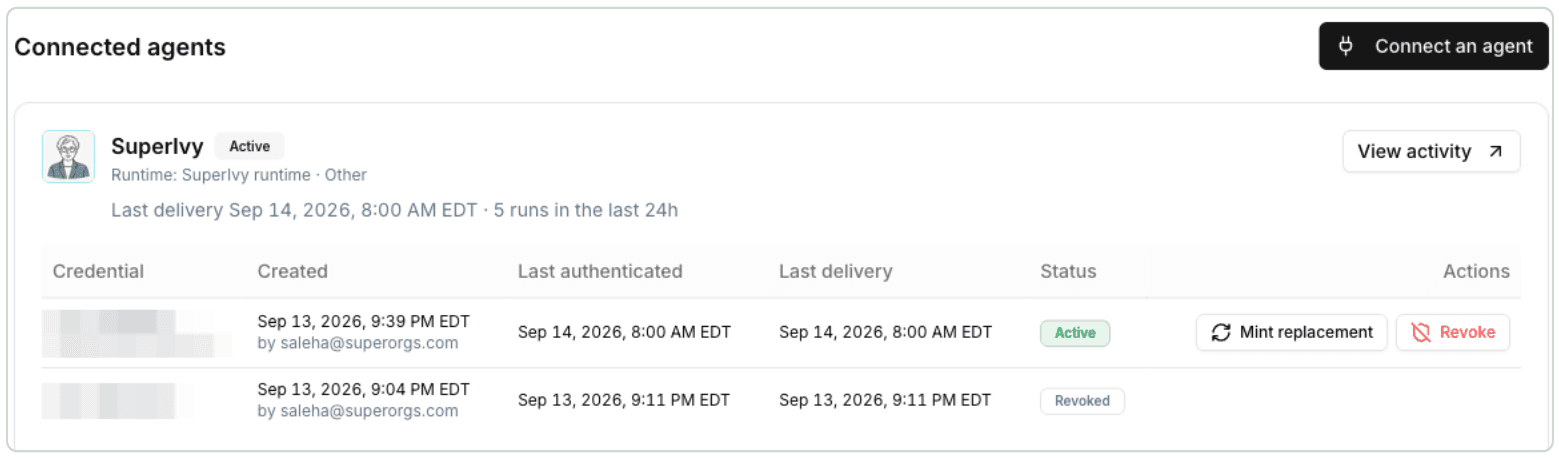
Figure 8. A live credential authorizes delivery. Last delivery establishes that a batch actually arrived. Credential values are obscured.
Follow a run into Activity
Ivy journals selected activity locally. The worker delivers batches to SuperOrgs, where accepted events appear against the linked agent. Verify that whole path:
- Use an agreed, bounded Ivy operation or the next scheduled run. Note its run identifier and outcome in Ivy.
- Open Connections in Ivy and inspect acknowledgements, pending or rejected events, and worker health.
- Return to SuperOrgs SDK and inspect Last delivery for the expected credential. Last authenticated means a request authenticated, which is a different signal.
- Open SuperIvy's Activity and match the run. Inspect its outcome, coverage gaps, tokens and estimated cost, then follow the artifact link to Ivy's saved report. Sign in when required.
Events are recorded only while both destination settings are configured. Enabling streaming does not reconstruct old activity. Journal rows survive restart with their database.
Transient failures retry through the worker; permanent rejections are parked for investigation. Correct the underlying problem before using pnpm outbox:replay --run <runRef> --dead --attention for a specific run; pnpm outbox:replay --resume requests a recheck but does not reload changed environment values.
Expected result: a saved run, acknowledgement and matching execution. Delivery does not complete an ability, move Onboarding to Active, or approve a proposal. Reported cost is not the full operating bill.
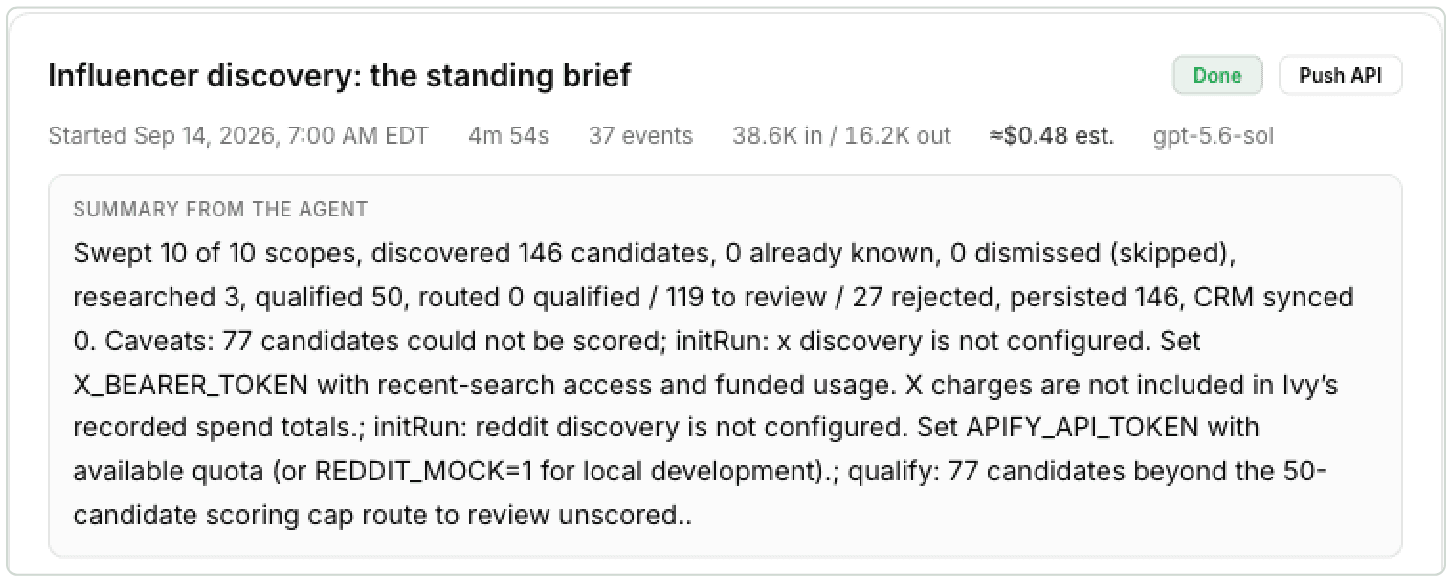
Figure 9. Match the execution identifier and outcome to Ivy. Review reported coverage and artifact links as part of the same check.
Measure useful engagement. Success for this documentation means qualified engineering and operations engagement: substantive technical feedback, a concrete setup attempt, or workflow adoption. Record the person's role, action, follow-up and resulting improvement. Page views and acknowledged events alone do not establish this outcome; no engagement result is claimed here.
Deployment
Deploy a reviewed change
Use an isolated worktree of the intended revision, Node.js 22 and pnpm 11.5.3. For a new local environment only, run this from the repository root. Preserve an existing .env.local:
pnpm install --frozen-lockfile
cp .env.example .env.local
pnpm db:migrate
Configure development credentials before starting integrations; keep production Slack tokens out of local workers. Run pnpm dev for the workspace at http://localhost:3000 and pnpm worker in a separate terminal for jobs, schedules and delivery. Both use the configured database; local storage defaults under ./data.
Run pnpm check before review. It performs type checking, linting, the test suite and a production build. Exercise the affected workflow through the browser and inspect its saved outcome. Model-dependent changes also need a configured evaluation with an explicit spending cap, such as pnpm eval:live --max-usd 2.
The existing production target is Fly app superivy, region ewr. A push or merge to main starts GitHub's Deploy workflow. Pushes to other branches do not deploy. The workflow resolves one immutable commit, runs checks on that commit, verifies action pins and ancestry against the live release, then checks model credentials before changing the machine. The GitHub production environment supplies FLY_API_TOKEN.
Deployments are serialized. The workflow replaces the single machine, then verifies the intended release, schema, database and worker.alive through /api/ready. Check the workflow result and one bounded acceptance case, including its Slack receipt or SuperOrgs acknowledgement when relevant. A successful rollout makes the new worker code govern Slack behavior; credentials and permission changes still require configuration.
Manual dispatch uses the same guarded path. A failed rollout can restore the previous image when the schema is unchanged. One-machine replacement causes an interruption; it is not a zero-downtime rollout.
Configuration and recovery
Keep local secrets in .env.local and production secrets in Fly. src/config.ts is the configuration boundary. Model selection belongs to fly.toml; stale model-setting secrets can override it and fail deployment preflight.
- Access and model.
AUTH_PASSPHRASEprotects production.OPENAI_API_KEYenables the release's OpenAI model.IVY_MODEL_PROVIDER,IVY_MODELandIVY_OPENAI_REASONING_EFFORTselect behavior; changing provider also requires its key and deployment guard. - Durable storage.
IVY_DB_PATH=/data/ivy.dbandIVY_REPORTS_DIR=/data/reports. The persistent volume retains records and PDFs.IVY_PUBLIC_URLsupplies workspace links. - Sources. GitHub can work unauthenticated;
GITHUB_TOKENincreases its allowance. Other sources requireYOUTUBE_API_KEY,X_BEARER_TOKENorAPIFY_API_TOKEN. Verify a source result, not only credential presence. - Slack.
SLACK_BOT_TOKEN,SLACK_APP_TOKEN,IVY_SLACK_TEAM_ID,IVY_SLACK_REPORT_CHANNELandIVY_SLACK_APPROVER_IDS. Ordinary-chat restrictions useIVY_SLACK_CHAT_CHANNEL_IDSandIVY_SLACK_CHAT_USER_IDS. Reinstall Ivy's app when permissions change. - SuperOrgs.
SUPERORGS_URLandSUPERORGS_STREAM_TOKEN; optionalSUPERORGS_AGENT_IDandSUPERORGS_ABILITY_IDsupply metadata. Verify acknowledged activity. - Optional destinations. Notion:
NOTION_TOKEN,NOTION_DATABASE_ID, integration access and matching property types. Databricks:DATABRICKS_HOST,DATABRICKS_TOKEN,DATABRICKS_WAREHOUSE_IDandDATABRICKS_SCHEMA.
Schema failure. Startup migrates before opening web and worker. Read the logged schema and recovery point. Keep maintenance active during restoration; follow the deployment playbook's ordering before starting a compatible image. Reverting code cannot undo a migration. Routine backups share the production volume, so retain a separate off-volume copy and rehearse restoration.
Worker interruption. Inspect the saved job and worker heartbeat. Queued work resumes; an interrupted execution requires an explicit new, linked retry and may incur new model spend. Do not start a second production worker or standalone Slack process.
Uncertain delivery. Inspect the saved receipt and destination before retrying. A timeout can follow a successful send. Use the relevant report, campaign or outbox recovery flow; preserve the original attempt and stable event identifiers.
Where to go next
Ivy reports its runs to SuperOrgs through the SDK, and the pages this guide walks through, Agent Planning, Agent Abilities, Agentic Pods, Connectors and Activity, are the same ones any agent uses. The activity streaming docs cover the API and the Node library. A demo shows the rest.